You’ve finished your draft. Now comes the part most writers dread: hunting down every typo, misplaced comma and continuity slip before anyone else sees them. Proofreading your own novel is entirely possible — thousands of authors do it as their final line of defense before a book leaves their hands — but it only works if you stop relying on willpower and start relying on process.
This guide gives you that process: why self-editing feels so impossible, a pass-by-pass proofreading workflow, the checklist that catches your personal blind spots, and how to let software do the tireless first sweep so your fresh eyes go further.
Why proofreading your own work is so hard
Your brain is a prediction machine. When you read someone else’s writing, you process the words on the page. When you read your own, you mostly process the memory of what you intended to say — and your mind quietly autocorrects whatever is actually there. Transposed letters vanish. Missing words appear. You read “the” twice in a row and swear it was once.
Psychologists sometimes call this familiarity blindness: the better you know a text, the worse you are at seeing it. After the tenth read-through of chapter three, you are the least qualified person in the world to spot its errors. No amount of concentration fixes this, because it isn’t an attention problem — it’s a perception problem. That’s why effective self-editing relies on process and tools rather than willpower: you can’t out-stare your own brain, but you can outsmart it.
Step away first
The cheapest way to get fresh eyes is time. Distance erodes the memory of what you meant to write — which is the very thing blinding you. For a novel, put the manuscript aside for two to four weeks after finishing the draft: long enough that the sentences no longer feel inevitable.
Work on something else in the meantime — a short story, the next book’s outline, anything that isn’t this manuscript. When you come back, you’ll be reading something much closer to what a reader sees, and errors that survived fifty read-throughs start to glow on the page.
Proofread in passes, not all at once
Trying to catch every kind of problem in a single read guarantees you’ll miss most of them. Attention is single-threaded: while you’re judging whether a scene earns its place, you’re blind to its comma splices. Proofread in passes, each with one job:
- Pass 1 — Story and structure. Plot holes, pacing, scenes that earn their place, character arcs that land. Big fixes first — there’s no point polishing prose you’re about to cut.
- Pass 2 — Style and clarity. Clunky sentences, repeated words, point-of-view wobbles, dialogue where every character sounds the same.
- Pass 3 — Mechanics. Spelling, grammar, punctuation, typos. This is the true proofreading pass, and it comes last, when nothing above it will change.
Within each pass, chase one problem type at a time. A read-through just for dialogue punctuation will catch things ten general read-throughs won’t.
It also helps to change the format between passes. Move the manuscript to a different device, switch the font, or read it aloud — your tongue stumbles where your eyes glide. Narrative’s full-screen reading mode is built for exactly this: it presents your book the way a reader will see it, with no cursor and no toolbars, so you review the text instead of the document.
Let software be your second pair of eyes
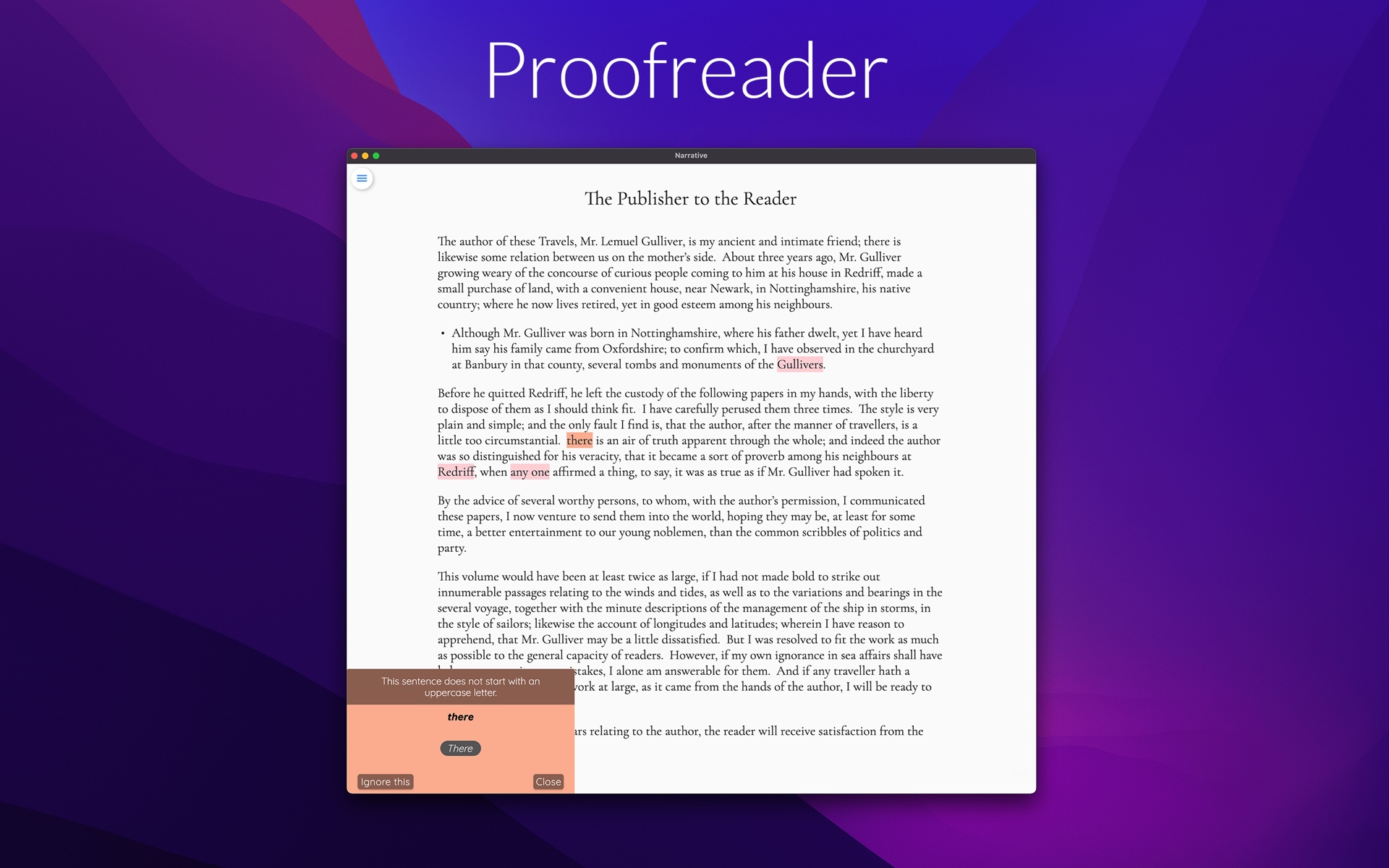
A proofreader doesn’t get tired. It reads page 300 as closely as page 1 — catching the grammar, spelling and style slips your own eyes skate over after hours in the same manuscript. It flags; you decide. Accept, ignore or override every suggestion: you’re still the author.
That control matters most in fiction. Novels break rules on purpose — fragments for rhythm, dialect in dialogue, a sentence that starts with “And” because it should. A proofreader worth using suggests rather than corrects, so you can bend a rule wherever you need to.
Narrative’s built-in proofreader checks grammar, spelling and style as you type, across 12 languages and dialects. Drafting? Toggle the hints off so nothing interrupts the flow, then switch them on when you move into revision — and since your work syncs across every device, you can draft at your desk and proofread on the sofa.

Draft your novel in Narrative
Narrative is a distraction-free novel writing app: a minimalist editor with focus mode and dark mode, real-time sync across iPhone, iPad, Mac, Windows, Android and web — offline too — word count goals with daily, weekly and monthly statistics, and notes attached to your project or chapters. No AI generators: your draft stays entirely yours.
Start NowA self-editing checklist that catches what you always miss
Every writer has signature mistakes — error types their own brain will never flag. Find yours once, then hunt them deliberately on every pass. A starter checklist for proofreading your manuscript:
- Their/there/they’re-type confusions. Also its/it’s, your/you’re, then/than. Search for each spelling and check every instance.
- Dialogue punctuation. Commas inside closing quotes, lowercase after a dialogue tag, em dashes for interruptions.
- Repeated sentence starts. Too many sentences in a row opening with “She” or “The.”
- Filter words. “She saw,” “he felt,” “she noticed” standing between the reader and the moment.
- Character name consistency. Rachel or Rachael? Names, nicknames and titles spelled the same way on page 9 and page 290.
Keep the list somewhere you’ll actually use it — Narrative lets you attach notes to your whole project or to individual chapters, so your checklist can live next to the page you’re proofing.
When to bring in a human
Self-editing has a ceiling, and knowing where it is will save you embarrassment. Software catches mechanics — the typos, the comma splices, the repeated words. Beta readers catch story: the scene that confused them, the twist they saw coming, the character they never believed. And before publication, a professional proofreader is worth the money for the same reason you can’t proofread perfectly yourself: they’ve never met your manuscript.
When you’re ready to share, send a clean file. Narrative exports your manuscript to DOCX, TXT and EPUB, so beta readers get a document they can open anywhere and your proofreader gets exactly the text you approved. If you’re publishing digitally, our guide to exporting your novel to EPUB walks through the whole process.
Your cleanest draft yet
Learning to proofread your own novel takes practice — but with distance, passes, a personal checklist and a tireless digital assistant, it stops being a losing battle against your own brain. Each pass makes the next one shorter, and each book makes you better at catching your signature mistakes.
Because Narrative takes automatic version snapshots, every revision pass is safe: if an edit goes too far, the earlier draft is always there. Start the 14-day free trial, run your mechanics pass with the proofreader switched on, and see how much cleaner your manuscript comes out. Keep writing afterwards, with unlimited access from $5/month.
Start your novel today
Free 14-day trial on every platform — fully functional, no credit card required. Unlimited access for $5/month.